Friday, April 27, 2012
- Use SELECT_OPTIONS_RESTRICT function module to make use of SELECT-OPTIONS easier on the selection screen.
Wednesday, April 11, 2012
REPORT ztest.

DATA data_cc TYPE string.
CONCATENATE '''' 'Concatenate' '''' INTO data_cc.

WRITE data_cc.

Tuesday, April 10, 2012
Program steps
- Create Web Dynpro Component with Window and View(Automatically View is embedded into Window).

- Go to Component Controller COMPONENTCONTROLLER.
- Context tab->Create COUNTRY node with cardinality 0..n and attributes(refer to T005T structure).


- Methods tab->Write the code in WDDOINIT to populate data to show countries as list.

- WDDOINIT code
METHOD wddoinit .
  wd_this->get_listbox_data(  ).
ENDMETHOD.
METHOD get_listbox_data .
  DATA lo_nd_country TYPE REF TO if_wd_context_node.

  DATA lt_country TYPE wd_this->elements_country.

* navigate from <CONTEXT> to <COUNTRY> via lead selection
  lo_nd_country = wd_context->get_child_node( name = wd_this->wdctx_country ).
  SELECT land1 landx
    FROM t005t
    INTO CORRESPONDING FIELDS OF TABLE lt_country
    WHERE spras = sy-langu.
  lo_nd_country->bind_table( new_items = lt_country set_initial_elements = abap_true ).
ENDMETHOD.

- GET_SELECTED_RECS code
METHOD get_selected_recs .
*   "Get selected Elements
  DATA lo_nd_country TYPE REF TO if_wd_context_node.
  DATA lt_country TYPE wd_this->elements_country.
  data: ls_country TYPE wd_this->element_country.
  data: lt_ctry    TYPE wd_this->elements_country.
  DATA lt_elements TYPE wdr_context_element_set.
  DATA ls_elements TYPE REF TO if_wd_context_element.
  "Navigate from <CONTEXT> to <COUNTRY> via lead selection
  lo_nd_country = wd_context->get_child_node( name = wd_this->wdctx_country ).
  lt_elements = lo_nd_country->get_selected_elements(  ).
  LOOP AT lt_elements INTO ls_elements.
   ls_elements->get_static_attributes( IMPORTING static_attributes = ls_country ).
    APPEND ls_country TO lt_ctry.
  ENDLOOP.
 "Display selected Elements
    DATA lo_nd_dsp_coutries TYPE REF TO if_wd_context_node.
    DATA lt_dsp_coutries TYPE wd_this->elements_dsp_coutries.

*   navigate from <CONTEXT> to <DSP_COUTRIES> via lead selection
    lo_nd_dsp_coutries = wd_context->get_child_node( name = wd_this->wdctx_dsp_coutries ).
    LOOP AT lt_ctry INTO ls_country.
     SELECT *
       FROM t005t
      APPENDING CORRESPONDING FIELDS OF TABLE lt_dsp_coutries
       WHERE spras = sy-langu
         AND land1 = ls_country-land1.
    ENDLOOP.
    lo_nd_dsp_coutries->bind_table( new_items = lt_dsp_coutries set_initial_elements = abap_true ).

ENDMETHOD.
- Context tab->Map context of Component controller to context of view.


- Layout tab->define UI elements 1). ItemListBox 2). Button and OnAction event 3). Table as shown below.


- Methods tab->call GET_SELECTED_RECS method from ONACTIONDISPLAY_SELECTED event handler method.
METHOD onactiondisplay_selected .
  DATA lo_componentcontroller TYPE REF TO ig_componentcontroller .
  lo_componentcontroller =   wd_this->get_componentcontroller_ctr( ).

  lo_componentcontroller->get_selected_recs(  ).

ENDMETHOD.

- Run application.

Sunday, April 8, 2012
- Create Web dynpro component and application as in the my previous post - Web Dynpro ABAP - ALV Total and Subtotal
- Setting the ALV design
- Define the usage of ALV component ALV_COMPONENT in the properties for your view. Since we need the object model for our changes, choose the With Controller Access variant (component interface).
- Go to view ALV_V -> Methods tab ->Create GET_COLOR-Write the code to get the layout with different designs->Call that method in WDDOINIT.
- Steps in GET_COLOR method.
- Getting the instance of ALV Component and Interface Controller.
- Change the layout design.
- Code in GET_COLOR method.
- Report outputs with colors
METHOD get_color .

  "Create instance for ALV Component usage.
  DATA lo_cmp_usage TYPE REF TO if_wd_component_usage.

  lo_cmp_usage =   wd_this->wd_cpuse_alv_component( ).
  IF lo_cmp_usage->has_active_component( ) IS INITIAL.
    lo_cmp_usage->create_component( ).
  ENDIF.
  "Get config model
  DATA lo_interfacecontroller TYPE REF TO iwci_salv_wd_table .
  lo_interfacecontroller =   wd_this->wd_cpifc_alv_component( ).
  DATA lr_config_table TYPE REF TO cl_salv_wd_config_table.
  lr_config_table = lo_interfacecontroller->get_model( ).

  "Layout design
  lr_config_table->if_salv_wd_table_settings~set_design( value = cl_wd_table=>e_design-transparent ).
ENDMETHOD.


- Create Web Dynpro Component with Window and View(Automatically View is embedded into Window).

- Define Component Use ALV for the Used component SALV_WD_TABLE under Used Components tab of Web Dynpro Component.

- Go to Component Controller COMPONENTCONTROLLER.
- Properties tab->Define or Include Used Controllers/ Components of ALV.


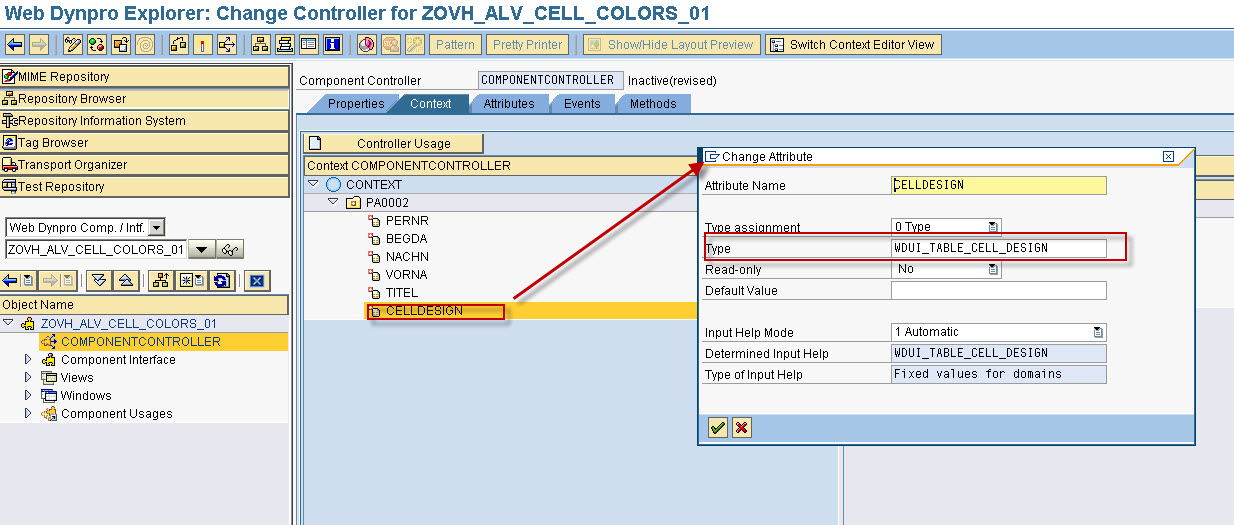
- Context tab->Create PA0002 node with cardinality 0..n as shown in the picture. CELLDESIGN attribute is used to set colour of the cell.
- Methods tab->Write the code in WDDOINIT to populate data in ALV and Change ALV Configuration.

- WDDOINIT method code
METHOD wddoinit .
  wd_this->get_data( ).
  wd_this->configure_alv( ).
ENDMETHOD.
METHOD get_data .
  DATA lo_nd_pa0002 TYPE REF TO if_wd_context_node.
  DATA lt_pa0002 TYPE wd_this->elements_pa0002.
  DATA ls_pa0002 LIKE LINE OF  lt_pa0002.
  "Navigate from <CONTEXT> to <PA0002> via lead selection
  lo_nd_pa0002 = wd_context->get_child_node( name = wd_this->wdctx_pa0002 ).
  SELECT *
    FROM pa0002
    INTO CORRESPONDING FIELDS OF TABLE lt_pa0002
    UP TO 40 ROWS.
  LOOP AT lt_pa0002 INTO ls_pa0002.
    ls_pa0002-celldesign = cl_wd_table_column=>e_cell_design-goodvalue_light.
    MODIFY lt_pa0002 FROM ls_pa0002.
  ENDLOOP.
  lo_nd_pa0002->bind_table( new_items = lt_pa0002 set_initial_elements = abap_true ).

ENDMETHOD.
METHOD configure_alv .
  "Instantiate Used Component
  DATA lo_cmp_usage TYPE REF TO if_wd_component_usage.
  lo_cmp_usage =   wd_this->wd_cpuse_alv( ).
  IF lo_cmp_usage->has_active_component( ) IS INITIAL.
    lo_cmp_usage->create_component( ).
  ENDIF.
  "Create an instance of ALV Interface Controller
  DATA lo_interfacecontroller TYPE REF TO iwci_salv_wd_table .
  lo_interfacecontroller =   wd_this->wd_cpifc_alv( ).
  "Configuration of the ALV Output
  DATA lv_value TYPE REF TO cl_salv_wd_config_table.
  lv_value = lo_interfacecontroller->get_model( ).
  DATA:
        lr_column_settings TYPE REF TO if_salv_wd_column_settings,
        lt_columns         TYPE salv_wd_t_column_ref,
        ls_columns         LIKE LINE OF lt_columns,
        l_column   type REF TO cl_salv_wd_column.

  lr_column_settings ?= lv_value.
  lt_columns = lr_column_settings->get_columns( ).
  LOOP AT lt_columns INTO ls_columns.
    CASE ls_columns-id.
      WHEN 'PERNR'.
      ls_columns-r_column->set_cell_design_fieldname( value = 'CELLDESIGN' ).
      lv_value->if_salv_wd_column_settings~delete_column( id = 'CELLDESIGN' ).
    ENDCASE.
  ENDLOOP.

ENDMETHOD.
- Layout tab->Create View Container UI element to display ALV output.

- Go to INTERFACECONTROLLER_USAGE of ALV->Map Context node PA0002 of component controller to node DATA of ALV Interface Controller.


- Go to window CELL_COLOR_W->Embed TABLE view of SALV_WD_TABLE component in window as shown in the screen.

- Activate Web Dynpro component.
- Create Web Dynpro Application and Save it as local object.


- Run web dynpro application.

Thursday, April 5, 2012
Procedure.
- Create Web dynpro alv program by using ALV component SALV_WD_TABLE.
- Configure the ALV to get hypertext link for ALV column
- Define one event handler method ON_CLICK in the view controller for ON_CLICK event of SALV_WD_TABLE interface controller.
- Identify Click in a Cell of ALV Output in event handler method ON_CLICK.
- Implement WDDOMODIFYVIEW to set data based on click in a Cell.
- Create One Web Dynpro application for ALV output. Click here to check on how to create.
- Go to Component controller of web dynpro component
- Methods tab ->Define CONFIGURE_ALV method and write the code as specified.

- CONFIGURE_ALV method code
METHOD configure_alv .
  "Instantiate Used Component
  DATA lo_cmp_usage TYPE REF TO if_wd_component_usage.
  lo_cmp_usage =   wd_this->wd_cpuse_alv( ).
  IF lo_cmp_usage->has_active_component( ) IS INITIAL.
    lo_cmp_usage->create_component( ).
  ENDIF.
  "Create an instance of ALV Interface Controller
  DATA lo_interfacecontroller TYPE REF TO iwci_salv_wd_table .
  lo_interfacecontroller =   wd_this->wd_cpifc_alv( ).
  "Configuration of the ALV Output
  DATA lv_value TYPE REF TO cl_salv_wd_config_table.
  lv_value = lo_interfacecontroller->get_model( ).
  DATA:
        lr_column_settings TYPE REF TO if_salv_wd_column_settings,
        lt_columns         TYPE salv_wd_t_column_ref,
        ls_columns         LIKE LINE OF lt_columns.

  lr_column_settings ?= lv_value.
  lt_columns = lr_column_settings->get_columns( ).
  LOOP AT lt_columns INTO ls_columns.
    CASE ls_columns-id.
      WHEN 'PERNR'.
        DATA:lr_link TYPE REF TO cl_salv_wd_uie_link_to_action.
        CREATE OBJECT lr_link.
        lr_link->set_text_fieldname( ls_columns-id ).
        ls_columns-r_column->set_cell_editor( lr_link ).
    ENDCASE.
  ENDLOOP.

ENDMETHOD.
- Call CONFIGURE_ALV method in WDDOINIT hook method.
METHOD wddoinit .
  wd_this->get_data( ).
  wd_this->configure_alv( ).
ENDMETHOD.

- Go to view ALV_EVENTS_V
- Properties tab->Define or Include Used Controllers/ Components of ALV.


- Context tab->Create node PA0006 with cardinality 0..n and another node EVENT_PROPERTIES(beneath NAME and VALUE are attributes) with cardinality 0..n.
- Context node EVENT_PROPERTIES is needed to hold the information on the last event.


- Map context node PA0002 of component controller to View context.


- Layout tab->Create one table UI element->Bind Context node PA0006 with table UI element.


- Method tab->Define ON_CLICK event handler method for ON_CLICK event of ALV Interface controller.


- ON_CLICK event handler method code.Here EVENT_PROPERTIES context node will be populated with details like column id, column index, column attributes and value of column.
- Bind the internal table to context node EVENT_PROPERTIES.
METHOD ON_CLICK .
  DATA: lr_node             TYPE REF TO if_wd_context_node,
        lt_event_properties TYPE wd_this->elements_event_properties,
        ls_event_properties TYPE wd_this->element_event_properties.

  FIELD-SYMBOLS:  TYPE ANY.
* fill internal table
  ls_event_properties-name = 'COLUMN_ID'.
  ls_event_properties-value = r_param->column.
  APPEND ls_event_properties TO lt_event_properties.

  ls_event_properties-name = 'INDEX'.
  ls_event_properties-value = r_param->index.
  APPEND ls_event_properties TO lt_event_properties.

  ls_event_properties-name = 'ATTRIBUTE'.
  ls_event_properties-value = r_param->attribute.
  APPEND ls_event_properties TO lt_event_properties.

  ASSIGN r_param->value->* TO <l_value>.
  ls_event_properties-name = 'VALUE'.
  ls_event_properties-value = <l_value>.
  APPEND ls_event_properties TO lt_event_properties.

* navigate to context node EVENT_PROPERTIES
  lr_node = wd_context->get_child_node( 'EVENT_PROPERTIES' ).
* bind internal table to context node
  lr_node->bind_table( lt_event_properties ).

ENDMETHOD.
- Populate context node PA0006 based on context EVENT_PROPERTIES. For that use WDDOMODIFYVIEW hook method.
- WDDOMODIFYVIEW method code
METHOD wddomodifyview .
  DATA lo_nd_event_properties TYPE REF TO if_wd_context_node.
  DATA: lt_event_properties TYPE wd_this->elements_event_properties,
        ls_event_properties LIKE LINE OF lt_event_properties.
  " Navigate from <CONTEXT> to <EVENT_PROPERTIES> via lead selection
  lo_nd_event_properties = wd_context->get_child_node( name = wd_this->wdctx_event_properties ).
  lo_nd_event_properties->get_static_attributes_table( IMPORTING table = lt_event_properties ).


  READ TABLE lt_event_properties INTO ls_event_properties WITH KEY name = 'INDEX'.
  DATA lo_nd_pa0002 TYPE REF TO if_wd_context_node.
  DATA lt_pa0002 TYPE wd_this->elements_pa0002.
  DATA ls_pa0002 TYPE wd_this->element_pa0002.
  " Navigate from <CONTEXT> to <PA0002> via lead selection
  lo_nd_pa0002 = wd_context->get_child_node( name = wd_this->wdctx_pa0002 ).
  lo_nd_pa0002->get_static_attributes_table( IMPORTING table = lt_pa0002 ).
  READ TABLE lt_pa0002 INTO ls_pa0002 INDEX ls_event_properties-value.

  DATA lo_nd_pa0006 TYPE REF TO if_wd_context_node.
  DATA lt_pa0006 TYPE wd_this->elements_pa0006.
  " Navigate from <CONTEXT> to <PA0006> via lead selection
  lo_nd_pa0006 = wd_context->get_child_node( name = wd_this->wdctx_pa0006 ).
  SELECT *
    FROM pa0006
    INTO CORRESPONDING FIELDS OF TABLE lt_pa0006
    WHERE pernr EQ ls_pa0002-pernr.
  lo_nd_pa0006->bind_table( new_items = lt_pa0006 set_initial_elements = abap_true ).

ENDMETHOD.

Sunday, April 1, 2012
The following example program is a step by step guide to use ON_CLICK event to user actions for the Button UI element.
Procedure.


Procedure.
- Create Web dynpro alv program by using ALV component SALV_WD_TABLE.
- Configure the ALV to get button for column
- Define one event handler method ON_CLICK in view controller for ON_CLICK event of SALV_WD_TABLE interface controller.
- Identify Click in a Cell of ALV Output in event handler method ON_CLICK.
- Implement WDDOMODIFYVIEW to set data based on click in a Cell.
- Create One Web Dynpro application for ALV output. Click here to check on how to create.
- Go to Component controller of web dynpro component
- Methods tab ->Define CONFIGURE_ALV method and write the code as specified.
- CONFIGURE_ALV method code
METHOD configure_alv .
  "Instantiate Used Component
  DATA lo_cmp_usage TYPE REF TO if_wd_component_usage.
  lo_cmp_usage =   wd_this->wd_cpuse_alv( ).
  IF lo_cmp_usage->has_active_component( ) IS INITIAL.
    lo_cmp_usage->create_component( ).
  ENDIF.
  "Create an instance of ALV Interface Controller
  DATA lo_interfacecontroller TYPE REF TO iwci_salv_wd_table .
  lo_interfacecontroller =   wd_this->wd_cpifc_alv( ).
  "Configuration of the ALV Output
  DATA lv_value TYPE REF TO cl_salv_wd_config_table.
  lv_value = lo_interfacecontroller->get_model( ).
  DATA:
        lr_column_settings TYPE REF TO if_salv_wd_column_settings,
        lt_columns         TYPE salv_wd_t_column_ref,
        ls_columns         LIKE LINE OF lt_columns.

  lr_column_settings ?= lv_value.
  lt_columns = lr_column_settings->get_columns( ).
  LOOP AT lt_columns INTO ls_columns.
    CASE ls_columns-id.
      WHEN 'PERNR'.
        DATA:lr_button TYPE REF TO cl_salv_wd_uie_button.
        CREATE OBJECT lr_button.
        lr_button->set_text_fieldname( ls_columns-id ).
        ls_columns-r_column->set_cell_editor( lr_button ).
    ENDCASE.
  ENDLOOP.

ENDMETHOD.                    "configure_alv
- Call CONFIGURE_ALV method in WDDOINIT hook method.
METHOD wddoinit .
  wd_this->get_data( ).
  wd_this->configure_alv( ).
ENDMETHOD.
- Activate web dynpro component and run application. The output would be like below.

- Go to view ALV_EVENTS_V
- Properties tab->Define or Include Used Controllers/ Components of ALV.
- Context tab->Create node PA0006 with cardinality 0..n and another node EVENT_PROPERTIES(beneath NAME and VALUE are attributes) with cardinality 0..n.
- Context node EVENT_PROPERTIES is needed to hold the information on the last event.
- Layout tab->Create one table UI element->Bind Context node PA0006 with table UI element.
- Method tab->Define ON_CLICK event handler method for ON_CLICK event of ALV Interface controller.
- ON_CLICK event handler method code.Here EVENT_PROPERTIES context node will be populated with details like column id, column index, column attributes and value of column.
- Bind the internal table to context node EVENT_PROPERTIES.
METHOD ON_CLICK .
  DATA: lr_node             TYPE REF TO if_wd_context_node,
        lt_event_properties TYPE wd_this->elements_event_properties,
        ls_event_properties TYPE wd_this->element_event_properties.

  FIELD-SYMBOLS:  TYPE ANY.
* fill internal table
  ls_event_properties-name = 'COLUMN_ID'.
  ls_event_properties-value = r_param->column.
  APPEND ls_event_properties TO lt_event_properties.

  ls_event_properties-name = 'INDEX'.
  ls_event_properties-value = r_param->index.
  APPEND ls_event_properties TO lt_event_properties.

  ls_event_properties-name = 'ATTRIBUTE'.
  ls_event_properties-value = r_param->attribute.
  APPEND ls_event_properties TO lt_event_properties.

  ASSIGN r_param->value->* TO <l_value>.
  ls_event_properties-name = 'VALUE'.
  ls_event_properties-value = <l_value>.
  APPEND ls_event_properties TO lt_event_properties.

* navigate to context node EVENT_PROPERTIES
  lr_node = wd_context->get_child_node( 'EVENT_PROPERTIES' ).
* bind internal table to context node
  lr_node->bind_table( lt_event_properties ).

ENDMETHOD.
- Populate context node PA0006 based on context EVENT_PROPERTIES. For that use WDDOMODIFYVIEW hook method.
- WDDOMODIFYVIEW method code
METHOD wddomodifyview .
  DATA lo_nd_event_properties TYPE REF TO if_wd_context_node.
  DATA: lt_event_properties TYPE wd_this->elements_event_properties,
        ls_event_properties LIKE LINE OF lt_event_properties.
  " Navigate from  to  via lead selection
  lo_nd_event_properties = wd_context->get_child_node( name = wd_this->wdctx_event_properties ).
  lo_nd_event_properties->get_static_attributes_table( IMPORTING table = lt_event_properties ).

  DATA lo_nd_pa0006 TYPE REF TO if_wd_context_node.
  DATA lt_pa0006 TYPE wd_this->elements_pa0006.

  " Navigate from <CONTEXT> to <PA0006> via lead selection
  lo_nd_pa0006 = wd_context->get_child_node( name = wd_this->wdctx_pa0006 ).
  READ TABLE lt_event_properties INTO ls_event_properties WITH KEY name = 'VALUE'.
  SELECT *
    FROM pa0006
    INTO CORRESPONDING FIELDS OF TABLE lt_pa0006
    WHERE pernr EQ ls_event_properties-value.
  lo_nd_pa0006->bind_table( new_items = lt_pa0006 set_initial_elements = abap_true ).

ENDMETHOD.
- Activate Web dynpro component.
- Run web dynpro application.


