Saturday, March 31, 2012
Definition: All systems that provide BI with data are described as source systems.
The ALV output is read-only by default. To allow users to change or enter new data then you have to make
some changes to the standard settings.
Procedure
The ALV output uses TextView as the cell editor for displaying data by default. To make it possible for users to enter or change existing data, replace this interface element with an interactive interface element, such as InputField.
The user can add rows at a specific position, attach them to the end of the ALV output, and delete them.
It is also possible to attach a whole page of empty rows, not only individual rows, to make it possible to enter mass data.
You must also define the time at which the system checks whether changed data is correct.
If the user changes or creates new data then it might be necessary to refresh the data manually or you might only want to refresh that data and not the whole ALV output.


GET_DATA method code.
Go to view CELL_EDIT_V

Go to INTERFACECONTROLLER_USAGE of ALV->Map Context node PA0006 of component controller to DATA of ALV Interface Controller.


some changes to the standard settings.
Procedure
- The write-protection for the ALV output must be deactivated before these actions can be executed.
lv_value->IF_SALV_WD_TABLE_SETTINGS~SET_READ_ONLY( ABAP_FALSE ).
  LOOP AT lt_column INTO ls_column.
    CASE ls_column-id.
      WHEN 'STRAS'.
        CREATE OBJECT lr_input_field
          EXPORTING
            value_fieldname = ls_column-id.
        ls_column-r_column->set_cell_editor( lr_input_field ).
    ENDCASE.
Program with steps
- Create Web Dynpro Component with Window and View(Automatically View is embedded into Window).

- Define Component Use ALV for the Used component SALV_WD_TABLE under Used Components tab of Web Dynpro Component.

- Go to Component Controller COMPONENTCONTROLLER
- Properties tab->Define or Include Used Controllers/ Components of ALV.


- Context tab->Create PA0006 node with cardinality 0..n.

- Methods tab->Write the code in WDDOINIT to populate data in ALV.

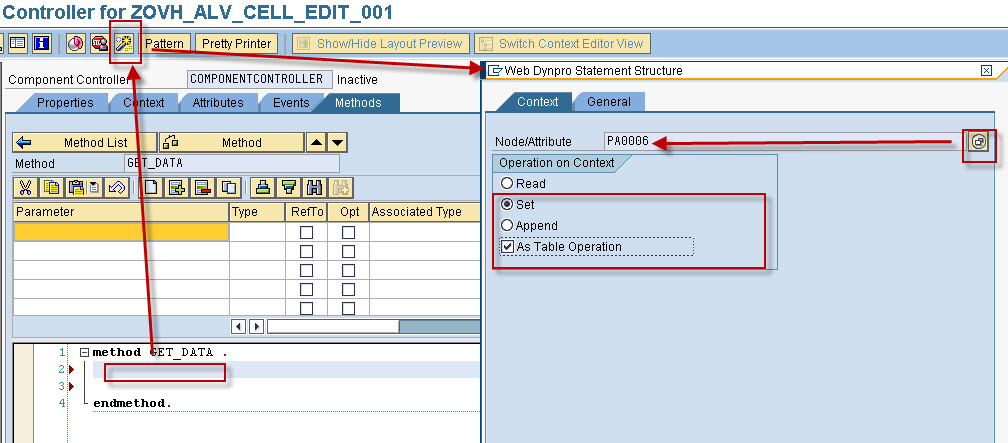
- WDDOINIT method code
METHOD wddoinit .
  "Get data
  wd_this->get_data(  ).
ENDMETHOD.
method get_data .

    data lo_nd_pa0006 type ref to if_wd_context_node.
    data lt_pa0006    type wd_this->elements_pa0006.
    "Navigate from <CONTEXT> to <PA0006> via lead selection
    lo_nd_pa0006 = wd_context->get_child_node( name = wd_this->wdctx_pa0006 ).
    "Get data
    select *
      from pa0006
      into corresponding fields of table lt_pa0006
      up to 10 rows
      where stras ne space.

    lo_nd_pa0006->bind_table( new_items = lt_pa0006 set_initial_elements = abap_true ).

endmethod.
- CHANGE_ALV_CONFIG method to change ALV configuration and make ALV table cell editable. This method would be called from view CELL_EDIT_V hook method WDDOINIT.
METHOD change_alv_config .
  "Create an instance of ALV component
  DATA lo_cmp_usage TYPE REF TO if_wd_component_usage.
  lo_cmp_usage =   wd_this->wd_cpuse_alv( ).
  "If not initialized, then initialize
  IF lo_cmp_usage->has_active_component( ) IS INITIAL.
    lo_cmp_usage->create_component( ).
  ENDIF.
  "Create an instance of ALV Interface Controller
  DATA lo_interfacecontroller TYPE REF TO iwci_salv_wd_table .
  lo_interfacecontroller =   wd_this->wd_cpifc_alv( ).
  "Configuration of the ALV Output
  DATA lv_value TYPE REF TO cl_salv_wd_config_table.
  lv_value = lo_interfacecontroller->get_model( ).

  DATA:
        lr_column_settings TYPE REF TO if_salv_wd_column_settings,
        lr_input_field     TYPE REF TO cl_salv_wd_uie_input_field.
  DATA:
       lt_column           TYPE salv_wd_t_column_ref,
       ls_column           TYPE salv_wd_s_column_ref.

  "Casting
  lr_column_settings ?= lv_value.
  "Get columns
  lt_column       = lr_column_settings->get_columns( ).
  LOOP AT lt_column INTO ls_column.
    CASE ls_column-id.
      WHEN 'STRAS'.
        CREATE OBJECT lr_input_field
          EXPORTING
            value_fieldname = ls_column-id.
        ls_column-r_column->set_cell_editor( lr_input_field ).
    ENDCASE.
  ENDLOOP.
  "Set read only mode to false (and display edit toolbar)
  DATA: lr_table_settings TYPE REF TO if_salv_wd_table_settings.
  lr_table_settings ?= lv_value.
  lr_table_settings->set_read_only( abap_false ).

ENDMETHOD.
- -Layout tab->Create View Container UI element to display ALV output.

- Methods tab->WDDOINIT method.
method WDDOINIT .
  DATA:
        lo_componentcontroller TYPE REF TO ig_componentcontroller .
  lo_componentcontroller =   wd_this->get_componentcontroller_ctr( ).
  lo_componentcontroller->change_alv_config(  ).

endmethod.


- Go to window CELL_EDIT_W->Embed TABLE view of SALV_WD_TABLE component in window as shown in the screen.


- Activate Web Dynpro component.
- Create Web Dynpro Application and Save it as local object.


- Run web dynpro application.

These are the available events in ALV for Web Dynpro ABAP.
Click on corresponding event name to check the implementation example.
Click on corresponding event name to check the implementation example.
| Event Name | Description of event | |
| TOP_OF_LIST | — | Top Of List of ALV |
| END_OF_LIST | — | End Of List of ALV |
| ON_AFTER_CONFIG | — | After loading the settings of a view |
| ON_CELL_ACTION | — | |
| ON_CLICK | — | After cicking in a cell of the ALV output |
| ON_DATA_CHECK | — | After the call for checking the data modification |
| ON_FUNCTION | — | After calling a self-defining application-specific function |
| ON_LEAD_SELECT | — | After changing the lead selection |
| ON_STD_FUNCTION_AFTE | — | After executing a standard ALV function |
| ON_STD_FUNCTION_BEFO | — | Before executing a standard ALV function |
Tuesday, March 27, 2012
- Create Web Dynpro Application - TOP OF LIST in ALV - Web Dynpro ABAP
- Go to Component Controller COMPONENTCONTROLLER
- Context tab->Create END_OF_LIST node with attribute CONTENT (type ref to CL_SALV_FORM_ELEMENT).


- Context tab-> Map node END_OF_LIST of ALV Component context to END_OF_LIST of Component Controller.

- Methods tab->Write the code in WDDOINIT to populate data in ALV and creating TOP_OF_LIST and END_OF_LIST events.

- WDDOINIT method code
method wddoinit.

  wd_this->get_pa0002_data(  ).
  wd_this->create_top_of_list(  ).
  wd_this->create_end_of_list(  ).

endmethod.
method create_end_of_list . data lo_nd_top_of_list type ref to if_wd_context_node. data lo_el_top_of_list type ref to if_wd_context_element. data ls_top_of_list type wd_this->element_top_of_list. data:lr_grid type ref to cl_salv_form_layout_grid. * TOP-OF-LIST **...create top grid create object lr_grid exporting columns = 5. *... fill 1. row lr_grid->create_text( exporting row = 1 column = 1 rowspan = 1 colspan = 1 text = 'Cell 1,1' ). lr_grid->create_text( exporting row = 1 column = 2 rowspan = 1 colspan = 1 text = 'Cell 1,2' ). lr_grid->create_text( exporting row = 1 column = 3 rowspan = 1 colspan = 1 text = 'Cell 1,3' ). lr_grid->create_text( exporting row = 1 column = 4 rowspan = 1 colspan = 1 text = 'Cell 1,4' ). lr_grid->create_text( exporting row = 1 column = 5 rowspan = 1 colspan = 1 text = 'Cell 1,5' ). *...fill 2nd row lr_grid->create_text( exporting row = 2 column = 1 rowspan = 1 colspan = 1 text = 'Cell 2,1' ). lr_grid->create_text( exporting row = 2 column = 2 rowspan = 1 colspan = 1 text = 'Cell 2,2' ). lr_grid->create_text( exporting row = 2 column = 3 rowspan = 1 colspan = 1 text = 'Cell 2,3' ). lr_grid->create_text( exporting row = 2 column = 4 rowspan = 1 colspan = 1 text = 'Cell 2,4' ). lr_grid->create_text( exporting row = 2 column = 5 rowspan = 1 colspan = 1 text = 'Cell 2,5' ). "Navigate fromto via lead selection lo_nd_top_of_list = wd_context->get_child_node( name = wd_this->wdctx_top_of_list ). "pass TOL to context node lo_nd_top_of_list = wd_context->get_child_node( name = 'END_OF_LIST' ). lo_el_top_of_list = lo_nd_top_of_list->get_element( index = 1 ). call method lo_el_top_of_list->set_attribute exporting value = lr_grid name = 'CONTENT'. endmethod.

Monday, March 26, 2012
- Create Web Dynpro Component with Window and View(Automatically View is embedded into Window).

- Define Component Use ALV for the Used component SALV_WD_TABLE under Used Components tab of Web Dynpro Component.

- Go to Component Controller COMPONENTCONTROLLER
- Properties tab->Define or Include Used Controllers/ Components of ALV.


- Context tab->Create PA0002 node with cardinality 0..n.

- Context tab->Create TOP_OF_LIST node with attribute CONTENT (type ref to CL_SALV_FORM_ELEMENT)

- Context tab-> Map node TOP_OF_LIST of ALV Component context to TOP_OF_LIST of Component Controller.

- Methods tab->Write the code in WDDOINIT to populate data in ALV and creating TOP_OF_LIST.
- WDDOINIT method code

METHOD wddoinit .

  wd_this->get_pa0002_data(  ).
  wd_this->create_top_of_list(  ).

ENDMETHOD.
METHOD get_pa0002_data .
  DATA lo_nd_pa0002 TYPE REF TO if_wd_context_node.
  DATA lt_pa0002 TYPE wd_this->elements_pa0002.

  "Navigate from <context> to <pa0002> via lead selection
  lo_nd_pa0002 = wd_context->get_child_node( name = wd_this->wdctx_pa0002 ).
  SELECT *
    FROM pa0002
    INTO CORRESPONDING FIELDS OF TABLE lt_pa0002
    UP TO 20 ROWS.
  lo_nd_pa0002->bind_table( new_items = lt_pa0002 set_initial_elements = abap_true ).

ENDMETHOD.
METHOD create_top_of_list.
  DATA lo_nd_top_of_list TYPE REF TO if_wd_context_node.
  DATA lo_el_top_of_list TYPE REF TO if_wd_context_element.
  DATA ls_top_of_list    TYPE wd_this->element_top_of_list.
  DATA:lr_grid           TYPE REF TO cl_salv_form_layout_grid.
* TOP-OF-LIST
**...create top grid
  CREATE OBJECT lr_grid
    EXPORTING
      columns = 5.

*... fill 1. row
  lr_grid->create_text(
    EXPORTING
      row = 1
      column = 1
      rowspan = 1
      colspan = 1
      text = 'Cell 1,1' ).

  lr_grid->create_text(
    EXPORTING
      row = 1
      column = 2
      rowspan = 1
      colspan = 1
      text = 'Cell 1,2' ).

  lr_grid->create_text(
    EXPORTING
      row = 1
      column = 3
      rowspan = 1
      colspan = 1
      text = 'Cell 1,3' ).

  lr_grid->create_text(
  EXPORTING
    row = 1
    column = 4
    rowspan = 1
    colspan = 1
    text = 'Cell 1,4' ).

  lr_grid->create_text(
EXPORTING
  row = 1
  column = 5
  rowspan = 1
  colspan = 1
  text = 'Cell 1,5' ).
*...fill 2nd row
  lr_grid->create_text(
    EXPORTING
      row = 2
      column = 1
      rowspan = 1
      colspan = 1
      text = 'Cell 2,1' ).

  lr_grid->create_text(
    EXPORTING
      row = 2
      column = 2
      rowspan = 1
      colspan = 1
      text = 'Cell 2,2' ).

  lr_grid->create_text(
    EXPORTING
      row = 2
      column = 3
      rowspan = 1
      colspan = 1
      text = 'Cell 2,3' ).

  lr_grid->create_text(
  EXPORTING
    row = 2
    column = 4
    rowspan = 1
    colspan = 1
    text = 'Cell 2,4' ).

  lr_grid->create_text(
EXPORTING
  row = 2
  column = 5
  rowspan = 1
  colspan = 1
  text = 'Cell 2,5' ).
  "Navigate from <context> to <top_of_list> via lead selection
  lo_nd_top_of_list = wd_context->get_child_node( name = wd_this->wdctx_top_of_list ).

  "pass TOL to context node
  lo_nd_top_of_list = wd_context->get_child_node( name = 'TOP_OF_LIST' ).
  lo_el_top_of_list = lo_nd_top_of_list->get_element( index = 1 ).

  CALL METHOD lo_el_top_of_list->set_attribute
    EXPORTING
      value = lr_grid
      name  = 'CONTENT'.

ENDMETHOD.
- Go to INTERFACECONTROLLER_USAGE of ALV->Map Context node PA0002 of component controller to DATAof ALV Interface Controller.


- Go to window ALV_TOL_W->Embed TABLE view of SALV_WD_TABLE component in window as shown in the screen.

- Activate Web Dynpro component.
- Create Web Dynpro Application and save it as local object.


- Run the web dynpro application

Thursday, March 22, 2012
- Go to Transaction SE93.
- Give the Transaction code to be created and press CREATE button.

- Give the description and Select the radio button Transaction with parameters.

- Give transaction WDYID and check Initial screen skip check box and press ENTER.

- Scroll down to Default Values table control and enter as shown in the screen shot.

- Save it as local object.
- Execute the transaction and web page is displayed.


Steps to achieve functionality


Change the code according to our requirement and make it workable.
Activate Web Dynpro Component
Create Web Dynpro Application and Save it as local object.


- Create Web Dynpro Component with Window and View(Automatically View is embedded into Window).

- Define Component Use OVS_PERNR for the Used component WDR_OVS under Used Components tab of Web Dynpro Component.

- Go to View OVS_V->Properties tab->Define or Include Used Controllers/ Components of OVS.


- Go to View OVS_V->Context tab
- Create node N1.
- Create one attribute PERNR of type NUM8(NUMC -8)
- Select Input Help mode as Object Value Selector
- Select OVS Component usage OVS_PERNR from F4 help.


- Go to View OVS_V->Layout tab->Create one input and bind it with node N1 attribute PERNR.

- Go to View OVS_V->Methods tab->Give method name as OVS_ON_FIELD, method type Event Handler and Select Event OVS of Component Usage OVS_PERNR from F4 help as shown in the figure.


- Double click on OVS_ON_FIELD method->Below code is auto generated.

- Auto Generated code
method OVS_SS .
* declare data structures for the fields to be displayed and
* for the table columns of the selection list, if necessary
  types:
    begin of lty_stru_input,
*   add fields for the display of your search input here
      field1 type string,
    end of lty_stru_input.
  types:
    begin of lty_stru_list,
*   add fields for the selection list here
      column1 type string,
    end of lty_stru_list.

  data: ls_search_input  type lty_stru_input,
        lt_select_list   type standard table of lty_stru_list,
        ls_text          type wdr_name_value,
        lt_label_texts   type wdr_name_value_list,
        lt_column_texts  type wdr_name_value_list,
        lv_window_title  type string,
        lv_group_header  type string,
        lv_table_header  type string.

  field-symbols:  type lty_stru_input,
                     type lty_stru_list.

  case ovs_callback_object->phase_indicator.

    when if_wd_ovs=>co_phase_0.  "configuration phase, may be omitted
*   in this phase you have the possibility to define the texts,
*   if you do not want to use the defaults (DDIC-texts)

      ls_text-name = `FIELD1`.  "must match a field name of search
      ls_text-value = `MYTEXT`. "wd_assist->get_text( `001` ).
      insert ls_text into table lt_label_texts.

      ls_text-name = `COLUMN1`.  "must match a field in list structure
      ls_text-value = `MYTEXT2`. "wd_assist->get_text( `002` ).
      insert ls_text into table lt_column_texts.

*      lv_window_title = wd_assist->get_text( `003` ).
*      lv_group_header = wd_assist->get_text( `004` ).
*      lv_table_header = wd_assist->get_text( `005` ).

      ovs_callback_object->set_configuration(
                label_texts  = lt_label_texts
                column_texts = lt_column_texts
                group_header = lv_group_header
                window_title = lv_window_title
                table_header = lv_table_header
                col_count    = 2
                row_count    = 20 ).


    when if_wd_ovs=>co_phase_1.  "set search structure and defaults
*   In this phase you can set the structure and default values
*   of the search structure. If this phase is omitted, the search
*   fields will not be displayed, but the selection table is
*   displayed directly.
*   Read values of the original context (not necessary, but you
*   may set these as the defaults). A reference to the context
*   element is available in the callback object.

      ovs_callback_object->context_element->get_static_attributes(
          importing static_attributes = ls_search_input ).
*     pass the values to the OVS component
      ovs_callback_object->set_input_structure(
          input = ls_search_input ).


    when if_wd_ovs=>co_phase_2.
*   If phase 1 is implemented, use the field input for the
*   selection of the table.
*   If phase 1 is omitted, use values from your own context.

      if ovs_callback_object->query_parameters is not bound.
******** TODO exception handling
      endif.
      assign ovs_callback_object->query_parameters->*
                              to .
      if not  is assigned.
******** TODO exception handling
      endif.

*     call business logic for a table of possible values
*     lt_select_list = ???

      ovs_callback_object->set_output_table( output = lt_select_list ).


    when if_wd_ovs=>co_phase_3.
*   apply result

      if ovs_callback_object->selection is not bound.
******** TODO exception handling
      endif.

      assign ovs_callback_object->selection->* to .
      if  is assigned.
*        ovs_callback_object->context_element->set_attribute(
*                               name  = `COLUMN1`
*                               value = -column1 ).
*      or
*        ovs_callback_object->context_element->set_static_attributes(
*                               static_attributes =  ).

      endif.
  endcase.

endmethod.
METHOD ovs_on_field .
  TYPES:
    BEGIN OF lty_stru_list,
*   add fields for the selection list here
          pernr TYPE pa0002-pernr,
          nachn TYPE pa0002-nachn,
          vorna TYPE pa0002-vorna,
    END OF lty_stru_list.

  DATA: lt_select_list   TYPE STANDARD TABLE OF lty_stru_list,
        ls_text          TYPE wdr_name_value,
        lt_label_texts   TYPE wdr_name_value_list,
        lt_column_texts  TYPE wdr_name_value_list.

  FIELD-SYMBOLS:     TYPE lty_stru_list.

  CASE ovs_callback_object->phase_indicator.
    WHEN if_wd_ovs=>co_phase_0.  "configuration phase, may be omitted
    WHEN if_wd_ovs=>co_phase_1.  "set search structure and defaults
    WHEN if_wd_ovs=>co_phase_2.
*   If phase 1 is implemented, use the field input for the
*   selection of the table.
*   If phase 1 is omitted, use values from your own context.
*     call business logic for a table of possible values
      SELECT pernr
             nachn
             vorna
        FROM pa0002
        INTO CORRESPONDING FIELDS OF TABLE lt_select_list
        UP TO 200 ROWS.
      ovs_callback_object->set_output_table( output = lt_select_list ).
    WHEN if_wd_ovs=>co_phase_3.
*   apply result
      ASSIGN ovs_callback_object->selection->* TO .
      IF  IS ASSIGNED.
        ovs_callback_object->context_element->set_static_attributes(
                               static_attributes =  ).
      ENDIF.
  ENDCASE.

ENDMETHOD.


- Run the Web Dynpro Application.


